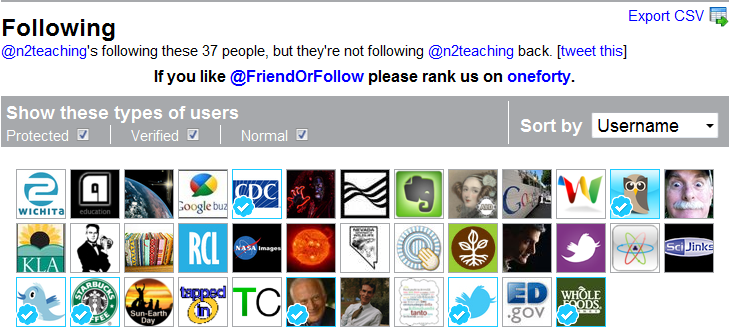
How many times have you opened your TwitterStream and discovered that it's overloaded with extraneous Tweets? I did, but now I've narrowed that group to those I want to follow no matter if they reciprocate.
Some of these are Tweets of people who once followed you, yet don't any more. There are a variety of reasons why people stop following you, but the most annoying are those that friend you until you friend them back. When you friend them back, they unfriend you. I don't know anyone who hasn't had this happen.
It's understandable when people unfriend me because they follow me onPlurk or a similar network. I usually go ahead and reciprocate. I unfriend them on Twitter. In the past this has been a bit difficult, but I've found a very helpful Twitter application to help with this process.
UsingFriend or Follow helps me sort through those people or organizations and decide who I will continue to follow or unfollow. Another positive aspect of Friend or Follow is that I can use it to find anyone who follows me, that I don't know about. I want to follow people who share interests with me.
In Friend or Follow, you can sort the followers, nonfollowers and friends by username or several other categories. I used this application to reduce those who don't follow me on Twitter.
I pared this group down to those that I will follow even if they don't follow me.
For instance, I follow Howard Rheingold, but he doesn't follow me. He is very generous and always responds to questions that I've asked him in the past. I will continue to follow him. I follow Starbucks, but they don't follow me on Twitter. That's OK, because we are friends on Facebook.
I used a fairly strict rubric that works for me. Each person needs to develop their own list or reasons for following or unfollowing, and Friend or Follow can help you decide by showing you a list of those who follow, don't follow or mutually follow you on Twitter.
While I have been using Plurk more often, I still collaborate with a group of educators and other like minded people that use Twitter. I'm not alone in the world, and neither are you. I post to Twitter and check out the stream at particular moments in time, but I don't always see my entire stream. I always wonder if I'm missing something significant.
I've found an online tool, a way to capture the essence of those I follow. I'm using paper.li. It's an online newspaper that's more than an rss feed. It has the look of a newspaper, and paper.li streams my Twitter contributions on the top fold.
Paper.li was created by Small Rivers to show how streaming data can be presented in an appealing way. At the moment their first "newspaper" style application is created from your Twitter feed, but the goal is to expand this web application for other streaming media.
If you haven't tried Paper.li, I would recommend it.
"Key Note" by william.neuheisel
Attribution License
Have you had trouble with spammers, phishers or other internet interlopers? Many of my Professional Learning Network, including me, have recently experienced troubles with our various interactive social networks, including blog comments and Twitter. There is also the less obvious, yet serious problem: thieves that steal your postings without attributing the work to you.
Do You Lock Your Online Doors? In the beginning, I didn't, but now I do. At first, I just tried to avoid the issue of phishing, spamming and theft. I ignored the Direct Messages, deleted the spam comments and stopped blogging. From my own experiences, that makes you more vulnerable which seems to be just what these people want. Just as you do at your own home, I would like to recommend that you take a more proactive stance against personal attacks. To begin with, I'd suggest that you LOCK YOUR DOORS!
The first time a phisher captured my Twitter account, I thought it was an accident. This first phisher was an educational group communicating with me. Eventually, as I discussed the problem on Twitter, they stopped sending their tweets of new blog posts in my name.
Unlocking by Gabriela Camerotti
Attribution-NonCommercial License
Even after that experience, I was naive. I didn't realize that some SEO's follow you with the hope that you will follow them. When you do follow them, they stop following you. They capture your Direct Messages to promote their new products, games, or blog posts. When you call their attention to it, they don't know what you are talking about since they don't even follow you. I wonder if you have had any similar experience?
Finally, I changed my password. That was very aggravating, but it did stop the phishing. I had to remember: "Lock the Doors!".
Another recent problem is spamming comments on my blog posts. Some of my professional learning network recommended allowing comments to go right to my blog, and I believed that would allow people to comment with the least trouble. That worked well for me for over two years, yet "a good deed never goes unpunished". Do you still allow open commenting without approval? If so, how do you deal with spammers?
Over the past two months, I've had at least five different spammers attack my blog comments section. I didn't notice it at first, as they were adding their spam comments to my older posts. Fortunately, I found them in the email notifications when new comments appear on my blog.
I wanted to counteract the spamming, but still allow unrestricted comments on my new posts. These are some of the measures that I instituted for this blog.
I locked down the comment postings on my old posts, and these comments had to be approved before they would be posted. That worked for about a week, but the spammers started direct attacks on my new posts. Has this happened to you?
In the end, I've changed all my blog comments approval system. Your comments must be approved before they will appear on my blog. Philosophically, I'm opposed to that. I want my readers to KNOW that all comments will be posted. I want to assure you that all comments, negative or positive, will be posted, unless they are off-topic spamming. How are you solving this blog comment spamming problem?
The last problem is the most offensive to me personally, just because it is so personal. I use one of the most generous Creative Commons copyrighting licenses available, but some people ignore it. They seem so desperate to appear creative and original that they don't make attributions of other blogger's work on their blog posts. Have you experienced this problem?
How did I discover it? Just as I discover cheaters in my classes, they usually give themselves up. Many are loosely connected to me in my professional learning network (PLN). When they advertise a new blog post about a topic of interest to me, I want to read it. My original intent is to learn more, but then I'm disappointed to find they use the same links that I've found to discuss the same idea from MY perspective. What's worse is the use of direct quotes from my blog posts without attributions. I'm flattered that they take my ideas or my words, but I would appreciate a simple link to my original article.
How are you dealing with this phenomena? My original response was to stop posting. That's a dead end proposal, because I want to write about my ideas, experiences and practices.
A new image web application, My Follower Mosaic, is available to interact with your Twitter account. It was recommended to our Professional Learning Network. After trying it, I would like to recommend it to keep track of your followers.
Sometimes, Twitter has a hiccup or two, and sometimes followers are inadvertently dropped from your network. This is very frustrating, especially when the followers didn't want it to happen, so it is recommended that you keep track of people interacting with you through this archival procedure. This web application does that.
Do keep in mind that these are YOUR FOLLOWERS, those who are following you. This mosaic contains some, but not all those you are following.